What the indicator actually means
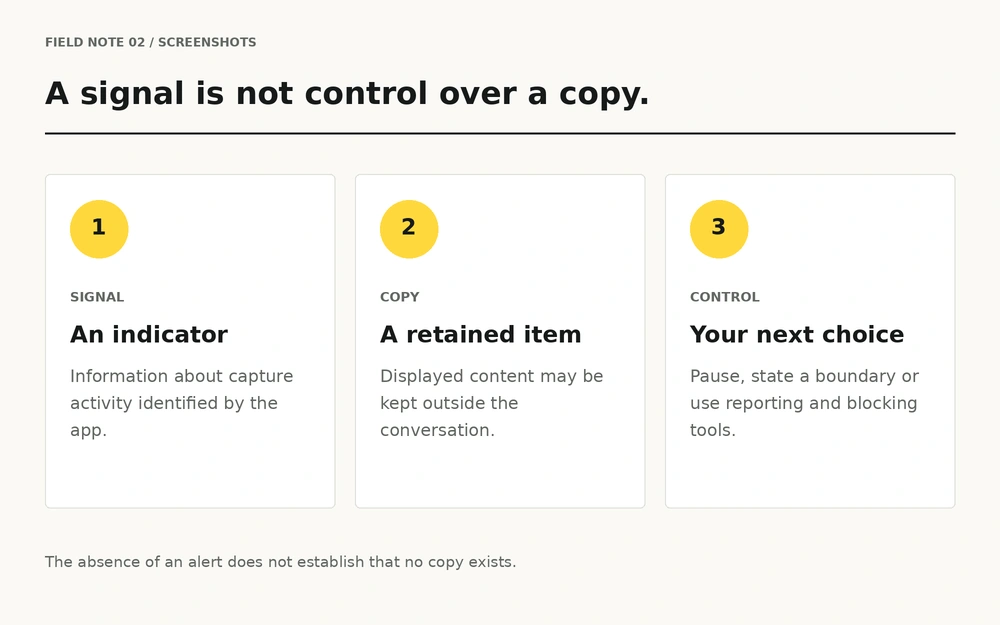
Snapchat documents screenshot icons for Snaps and Chats. Those indicators describe capture activity the service has identified. They are useful context, rather than an agreement about what the recipient may do next. Source: Chat screen icons.
Keep the question narrow: did the app display an indicator? Do not turn that into a broader claim that every possible copy would always be visible to you.
The copy problem remains
Snapchat explicitly warns that people who view content can capture and copy it, including by photographing a screen with another device. Source: Screenshots and copying.
This is why a disappearing interface is not a guarantee of confidentiality. A personal decision should not depend on perfect capture detection. If you would feel unsafe if the recipient kept a copy, pause rather than trying to solve the risk with a setting.
| Thing | What it tells you | What it does not guarantee |
|---|---|---|
| Screenshot indicator | The app has identified capture activity. | That every possible copy will be detected. |
| Disappearing message | A retention setting applies within the service. | That another person has no copy. |
| Delete action | You requested removal through the app. | That exported files disappear everywhere. |
Agree on boundaries before a conversation
Permission to read a message is different from permission to save it. Permission to save something is different again from permission to forward it. Say what you are comfortable with in ordinary language, and accept that the other person may prefer not to continue.
“Please do not save or share our personal messages.”
A clear boundary is useful even though it cannot enforce itself. Pressure, repeated requests or bargaining after a refusal are reasons to leave the conversation, not reasons to become more convincing.
If a message is captured unexpectedly
Pause the exchange. If you feel comfortable doing so, state your boundary and ask what happened. Avoid sending more personal material while trying to repair a breach of trust.
- Separate an accidental capture from a pattern of unwanted behaviour.
- Do not promise secrecy in return for deletion.
- Use blocking and reporting tools if someone pressures or threatens you.
- Do not download a so-called recovery or screenshot-proof app from an unknown link.
For threats or demands, move directly to the sextortion help guide.
Deletion is a different action
Removing a message through an app is not the same as removing an exported file from someone else's phone. Snap's guidance describes deletion attempts and their limits, including copies exported to a camera roll. Source: Saved media and deletion limits.
Ask for deletion if that is appropriate, but do not treat an on-screen confirmation as proof about every other device, backup or saved file.
A more useful privacy habit
Before sending a personal message, consider the recipient, the content and the consequences of a copy. Choose a less personal way to communicate when any of those feel uncertain. You can enjoy a conversation without proving trust through an image.
Respect the same rule in reverse. Do not save someone else's personal content to discuss it with friends, test a feature or win an argument. When reporting abuse, use official reporting tools rather than circulating the material.
Make decisions for the possibility of a copy, rather than for the promise of a notification.
Questions, answered.
Does Snapchat show screenshot indicators?
Snapchat's official icon guide documents screenshot indicators for Snaps and Chats. An indicator is not a guarantee that every capture method will be detected.
Does no screenshot alert mean nobody saved my message?
No. Treat the absence of an alert as a lack of that signal, rather than proof that no copy exists.
Can a Private Story still be copied?
Yes. A restricted audience does not make displayed content impossible to capture.
Can I make a personal message screenshot-proof?
Do not rely on that promise. A recipient who can see content may be able to retain a copy.
Should I confront someone who saved a message?
You can state your boundary if you feel safe doing so. For pressure or threats, stop the exchange and use blocking, reporting and support resources.
Where should I go if someone threatens to share an image?
Read the sextortion help guide and follow the official Snapchat reporting resources it links to.
Sources & further reading
- Snapchat Support: Chat screen icons
- Snapchat Support: Screenshots and copying
- Snapchat Support: Saved media and deletion limits
Official guidance reviewed on 20 October 2026. Menu names and feature behaviour can change; check the official page and your current app version. This article is independent educational information.