
Start with the conversation's retention setting
In the official deletion guide reviewed for this article, Snapchat lists several Chat retention choices, including after viewing, 24 hours after viewing, seven days and never. Check the actual conversation instead of assuming one timer applies to every feature. Source: When Snaps and Chats are deleted.
Retention is an app behaviour, not a consent agreement or a guarantee about another device. People can misunderstand a setting, change a preference or retain content outside the service.
Saved content has a different life
A conversation can contain both temporary material and content deliberately retained in the chat. Look at what remains visible instead of treating the entire thread as one disappearing object.
Discuss preferences plainly. If you do not want a personal message saved, say so before the exchange. You can also choose not to send it. No one needs to demonstrate affection or trust by accepting a retention choice they dislike.
| Action | Purpose | Limit |
|---|---|---|
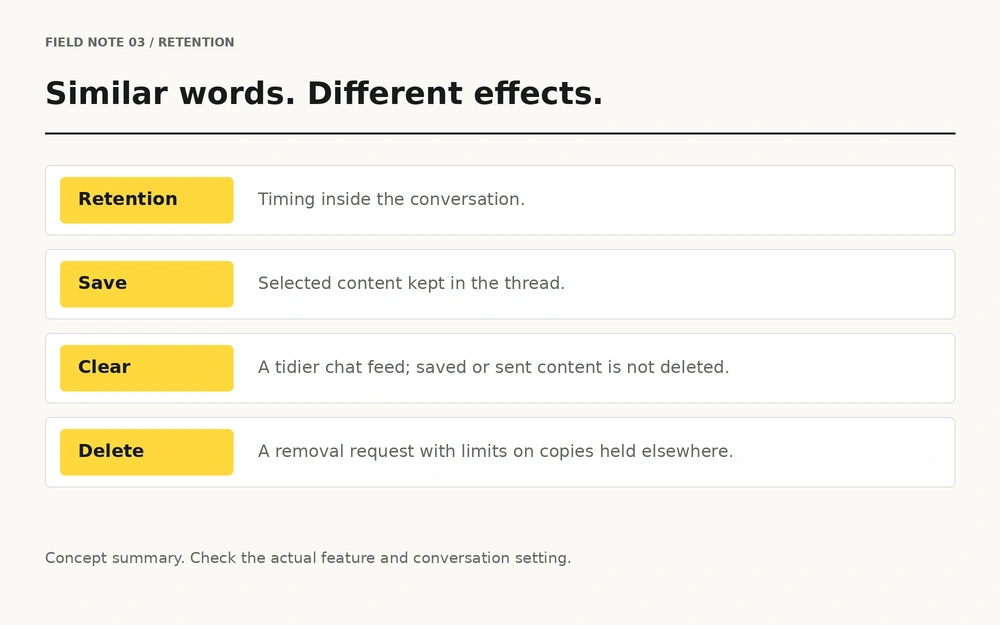
| Retention setting | Sets how eligible content is retained in the conversation. | It is not a universal anti-copy control. |
| Save in Chat | Keeps selected content in the thread. | Ask before retaining personal material. |
| Clear conversation | Tidies your chat feed. | It does not delete saved or sent content. |
| Delete content | Requests removal through the service. | Exported copies and other limitations remain. |
Clearing the feed is not deleting the content
Snapchat's clearing-conversations guide explicitly separates clearing a conversation from deleting saved or sent content. Source: Clearing a conversation.
That distinction matters when tidying a phone, handing a device to someone else or trying to understand what another person can still see. A conversation disappearing from your list describes your interface; it does not establish what exists elsewhere.
Understand what a deletion request can do
Snap says it attempts removal from friends' devices when a Snap is deleted, while noting limitations such as connection or app-version problems. It also says a sender cannot delete a copy exported to a recipient's camera roll. Source: Saved media and deletion limits.
Use available deletion controls where appropriate. Avoid describing the result as a remote erase of every possible copy, and avoid third-party tools that promise to retrieve or wipe someone else's private content.
Make your preferences visible
A short conversation about boundaries is more useful than silently assuming the other person shares your expectations. Discuss whether messages may be saved, whether personal topics are welcome and what should happen if either person changes their mind.
- Review the setting before relying on it.
- Ask before saving personal content.
- Respect a request to stop a conversation.
- Do not circulate material to prove that it existed.
Screenshot behaviour is a separate issue, covered in the screenshot notifications guide.
If retention becomes a threat
A disagreement about saved messages should not turn into pressure. If someone demands money, more images or continued contact to avoid sharing personal material, stop treating the situation as an app-settings problem.
Use the reporting and support guide. Keep useful account details and threat messages where safe, report through official channels and do not forward intimate material to enlist an audience.
A cleaner feed is not proof of a cleaner digital footprint. Know which action you are taking.
Questions, answered.
Do all Snapchat messages disappear at the same time?
No. Check the feature and the retention setting in the actual conversation. The official deletion guide explains the available choices.
Does clearing a Snapchat conversation delete saved messages?
No. Snapchat states that clearing a conversation does not delete saved or sent content.
Is deleting a Snap the same as clearing a chat?
No. Clearing concerns the chat feed; deleting concerns a particular item and has its own limits.
Can deleting a message remove a camera-roll copy?
Do not assume it can. Snap's support guidance says a sender cannot delete a recipient's exported camera-roll copy.
Should I rely on disappearing messages for confidentiality?
No. A recipient may still retain a copy. Decide what to share with that possibility in mind.
What if someone uses saved content to pressure me?
Stop the exchange and use the sextortion help and official reporting resources. You do not owe continued contact.
Sources & further reading
- Snapchat Support: When Snaps and Chats are deleted
- Snapchat Support: Clearing a conversation
- Snapchat Support: Saved media and deletion limits
Official guidance reviewed on 20 October 2026. Menu names and feature behaviour can change; check the official page and your current app version. This article is independent educational information.